LinkedIn Profile Photo AI Prompt: Free Pro Headshots (2026)
 Manish
October 6, 2026
13 min read
Manish
October 6, 2026
13 min read
Free LinkedIn profile photo AI prompt for Gemini and ChatGPT. Blazer, saree and kurta headshots with face lock and skin tone lock. Copy paste, tested
LinkedIn Profile Photo AI Prompt: Free Professional Headshots in Gemini & ChatGPT (2026)
A studio headshot in any Indian city costs somewhere between 1,500 and 4,000 rupees. Lights, makeup touch-up, forty awkward minutes, and one usable photo.
Or you upload a clear selfie, paste one prompt, and get the same corporate-grade headshot in thirty seconds. Free. That is the trend running on LinkedIn right now, and recruiters genuinely cannot tell when it is done right.
The problem is “done right”. Most AI headshot prompts floating around produce three failures. The face drifts into a stranger. The skin comes out plastic, like a mannequin in a blazer. And, the one nobody talks about, the AI quietly lightens Indian skin tones, so the photo looks like a fairness cream ad instead of you. Every prompt below is built to block all three: a strict FACE LOCK, a real-skin texture demand, and a SKIN TONE LOCK line that I have not seen in any other prompt list.
One honest rule before we start, and it matters: your LinkedIn photo must look like the person who walks into the interview room. These prompts polish the lighting, the outfit and the background. They do not build you a new face, and you should not want them to.
Key Takeaways
- One clear selfie plus one prompt gives you a studio-quality LinkedIn headshot in Gemini or ChatGPT, free.
- Every prompt carries a FACE LOCK and a SKIN TONE LOCK, so you stay you: same face, same complexion, no AI fairness filter.
- Five looks below: classic blazer, saree professional, kurta smart-ethnic, startup casual, and outdoor natural light, plus a bonus LinkedIn banner prompt.
- Generate in 1:1 square, because LinkedIn crops your photo into a circle. The framing lines inside each prompt handle that.
What a Recruiter’s Eye Actually Checks
Before the prompts, know what you are optimizing for. A LinkedIn profile photo has one job: make a stranger feel “is bande se baat ho sakti hai” in under a second. A few things decide that.
The photo displays as a small circle, so your face should fill roughly 60% of the frame, head and shoulders only, centered, with your eyes sitting in the upper third. Full-body shots and far-away poses turn into an unrecognizable dot.
The background should say nothing. A soft plain backdrop or a gently blurred office keeps every pixel of attention on your face. Busy backgrounds, group crops and bike-seat selfies all quietly cost you profile visits.
And the expression: a soft, confident smile with direct eye contact. Not a passport scowl, not a full laugh. Approachable and steady. Every prompt below bakes these rules in, so you do not have to remember any of this.
How to Use These Prompts (30 Seconds)
- Open Gemini (the free Nano Banana image model) or ChatGPT.
- Upload your best reference selfie: recent, front-facing, face fully visible, decent light, nobody else in the frame. If you wear glasses daily, wear them in the reference too.
- Copy a prompt below, paste it under your photo, send.
- If the result drifts from your face, reply once: “This does not match my uploaded photo. Keep my face 100% identical and regenerate.”
Upload the final image to LinkedIn, check the circle crop preview, done. Minimum size is 400 by 400 pixels, and these generate well above that.
1. The Classic Blazer Headshot (The Safe Winner)
The default corporate look that works for every industry, every age, every gender. If you only generate one, generate this.
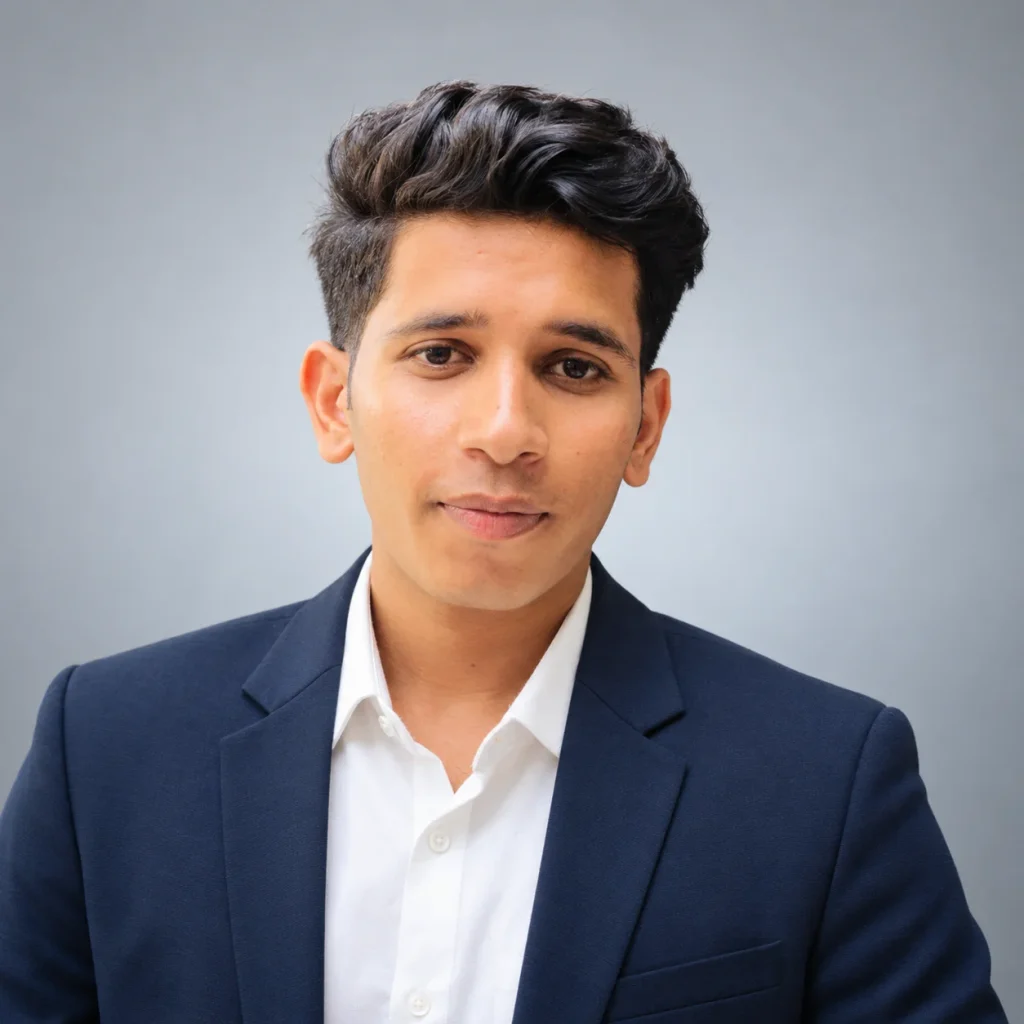
Use my uploaded photo as the only face reference. FACE LOCK: keep my face 100% identical to the photo: same face shape, eyes, eyebrows, nose, lips, jawline and natural asymmetry. Do not beautify, slim, reshape or airbrush my face. SKIN TONE LOCK: keep my exact natural skin tone, do not lighten, whiten or smooth my complexion in any way. If I am wearing glasses in my photo, keep the same glasses. Keep my existing hairstyle, neatly groomed. Create an ultra realistic professional LinkedIn headshot: I wear a well-fitted navy blue blazer over a plain white shirt, no tie, clean and modern. Framing: head and shoulders, centered, my eyes in the upper third of the frame, direct friendly eye contact with the camera, a soft confident smile. Background: a smooth light grey studio backdrop with a very subtle gradient, nothing else visible. Lighting: soft, even, diffused studio light on my face with a gentle catchlight in my eyes, no harsh shadows. Realistic skin with visible pores and natural texture, absolutely no plastic or airbrushed AI skin. Shot like a premium corporate photography session, 85mm lens feel, crisp focus on the face. Square 1:1 ratio. No text, no watermark.
Make it yours: swap “navy blue blazer” for charcoal grey or black, and “light grey backdrop” for soft blue. Everything else stays.
2. The Saree Professional (The Viral One)
The look that took over Indian LinkedIn: elegant, rooted, completely professional. Works beautifully for corporate, teaching, government and founder profiles.
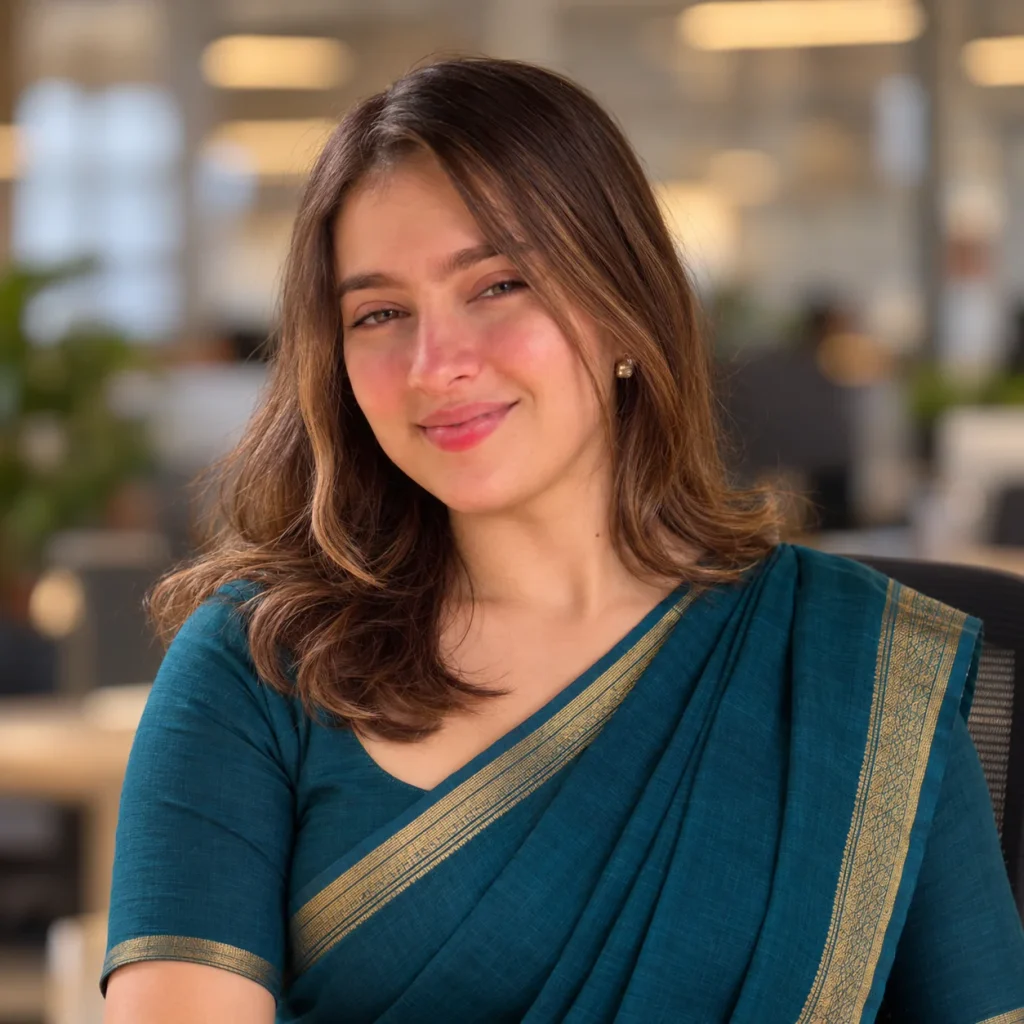
Use my uploaded photo as the only face reference. FACE LOCK: keep my face 100% identical: same face shape, eyes, eyebrows, nose, lips, jawline and natural asymmetry. No beautifying, no reshaping, no airbrushing. SKIN TONE LOCK: preserve my exact natural skin tone, do not lighten or whiten my complexion at all. Keep my glasses if I wear them in the photo, and keep my existing hair, styled in a neat professional way. Create an ultra realistic professional LinkedIn headshot: I wear an elegant solid-colour handloom saree in deep teal with a thin golden border, a modest matching blouse, small stud earrings and no heavy jewellery. Framing: head and shoulders, centered, eyes in the upper third, direct warm eye contact, a composed confident smile. Background: a softly blurred modern office with warm neutral tones, fully out of focus. Lighting: soft diffused daylight-style lighting, even on the face, gentle catchlight in the eyes, no harsh shadows. Realistic skin with natural texture and visible pores, no plastic AI finish. Premium corporate portrait photography, sharp focus on the face. Square 1:1 ratio. No text, no watermark.
Make it yours: maroon, navy or mustard saree all photograph brilliantly. Change one colour word.
3. The Kurta Smart-Ethnic (For Men Who Skip Blazers)
Bandhgala energy without the stiffness. Great for founders, creatives, consultants and anyone whose work is proudly desi.
Use my uploaded photo as the only face reference. FACE LOCK: keep my face 100% identical to the photo: same face shape, eyes, eyebrows, nose, lips, jawline and natural asymmetry. Do not beautify, reshape or airbrush my face. SKIN TONE LOCK: keep my exact natural skin tone, no lightening, no whitening, no smoothing filter. Keep my glasses if present, and my existing hairstyle and beard exactly as they are, neatly groomed. Create an ultra realistic professional LinkedIn headshot: I wear a crisp off-white cotton-silk kurta with a structured deep blue Nehru jacket over it, clean and sharply tailored. Framing: head and shoulders, centered, eyes in the upper third, direct steady eye contact, a relaxed confident half-smile. Background: a smooth warm beige studio backdrop with a soft gradient, nothing else in frame. Lighting: soft even studio lighting with a gentle catchlight in the eyes and a faint soft rim separating me from the background, no harsh shadows. Realistic skin texture with visible pores, no plastic AI skin. Premium editorial corporate photography, 85mm feel, sharp focus on the face. Square 1:1 ratio. No text, no watermark.
4. The Startup Casual (No-Blazer Professional)
For developers, designers, marketers and everyone whose office never asked for formals. Professional without pretending.
Use my uploaded photo as the only face reference. FACE LOCK: keep my face 100% identical: same face shape, eyes, eyebrows, nose, lips, jawline and natural asymmetry. No beautification, no reshaping, no airbrushing. SKIN TONE LOCK: my exact natural skin tone stays unchanged, do not lighten or whiten it. Glasses stay if I wear them, and keep my existing hairstyle, naturally neat. Create an ultra realistic modern LinkedIn headshot: I wear a plain, well-fitted charcoal crew-neck t-shirt under an open light-grey overshirt, minimal and clean. Framing: head and shoulders, centered, eyes in the upper third, easy direct eye contact, a natural friendly smile that reaches the eyes. Background: a bright modern workspace softly blurred into creamy bokeh, hints of warm wood and green plants, nothing readable. Lighting: soft window-style daylight from the front-left, even and flattering, gentle catchlight, no harsh shadows. Realistic skin with visible pores and true texture, no waxy AI finish. Shot like a premium tech-company team photo, shallow depth of field, face tack sharp. Square 1:1 ratio. No text, no watermark.
5. The Outdoor Natural Light (Freshers’ Favourite)
Soft daylight, green bokeh, zero studio feel. Perfect for students and first-job profiles that want warm over corporate.
Use my uploaded photo as the only face reference. FACE LOCK: keep my face 100% identical to the photo: same face shape, eyes, eyebrows, nose, lips, jawline and natural asymmetry. Do not beautify, slim, reshape or airbrush my face. SKIN TONE LOCK: preserve my exact natural skin tone, absolutely no lightening or whitening. Keep my glasses if present and my existing hairstyle, tidy and natural. Create an ultra realistic professional outdoor headshot: I wear a smart plain light-blue shirt with sleeves neatly in place, simple and fresh. Framing: head and shoulders, centered, eyes in the upper third, direct bright eye contact, a genuine warm smile. Background: a sunlit campus-style walkway with trees fully melted into soft green-gold bokeh, no people, nothing readable. Lighting: soft late-morning daylight with gentle warm rim light on my hair from behind, even open light on the face, no squinting, no harsh shadows. Realistic skin with natural texture and visible pores, no plastic AI finish. Premium natural-light portrait photography, shallow depth of field, crisp focus on the face. Square 1:1 ratio. No text, no watermark.
Bonus: The Matching LinkedIn Banner
The empty blue banner behind your photo is wasted space. One clean custom banner makes the whole profile look designed. Swap [YOUR FIELD] with your profession.
Create a clean, premium LinkedIn banner image in a wide 4:1 ratio, around 1584 by 396 pixels. Design: a smooth modern gradient from deep navy on the left to a soft teal on the right, with a very subtle abstract geometric pattern related to [YOUR FIELD] fading into the right side, extremely minimal and elegant. Keep the left half of the banner visually calm and uncluttered, because my profile photo sits at the bottom left. Soft professional colour palette, gentle grain for texture, high resolution, nothing busy. Absolutely no text, no logos, no watermark anywhere in the image. If the exact 4:1 ratio is not possible, generate the widest banner format you can and keep all design elements away from the bottom left corner.
The Skin Tone Lock: The Line Nobody Else Writes
Here is the uncomfortable truth about AI image models. Ask for a “professional headshot” and many of them quietly nudge Indian skin two or three shades lighter, because that is the bias baked into their training data. The result is technically a nice photo of someone who is not quite you, and it carries a message you never asked to send.
The fix is one explicit line, and every prompt above carries it: keep my exact natural skin tone, do not lighten, whiten or smooth my complexion. If a result still comes out lighter than you, do not accept it. Reply “restore my exact natural skin tone from the uploaded photo” and regenerate. Your complexion is not a flaw to be corrected, and your LinkedIn photo should agree.
The One Honest Rule
An AI headshot is your real face in better light, not a younger, slimmer, fairer character. Keep the glasses you actually wear. Keep your real hairline. Keep the face your interviewer will meet. The prompts enforce this with the FACE LOCK, but you are the final judge: if the photo makes you nervous about showing up in person, regenerate it closer to reality. Confidence on LinkedIn comes from a photo you can stand next to.
FAQs
Is it okay to use an AI-generated photo on LinkedIn?
Yes, when it is a polished version of your real face from your real photo, which is exactly what these prompts produce. Think of it as studio lighting, not a mask. What crosses the line is a photo that no longer looks like you, a different face, a heavily younger you, a changed complexion. The FACE LOCK and the honest rule above keep you on the right side.
Why do some AI headshots look plastic?
Because most prompts never ask for real skin. Models default to a smoothed, waxy finish that screams AI from across the room. These prompts demand visible pores and natural texture and ban the airbrushed look. If a result still feels waxy, reply “more realistic skin texture, visible pores, reduce smoothing” and run it again.
Which selfie should I upload as the reference?
Recent, front-facing, good even light, face fully visible, only you in the frame. A plain background helps but is not required. Avoid heavy filters, caps and sunglasses. And if you wear spectacles every day, wear them in the reference, the prompts are built to keep them.
Why did the AI lighten my skin, and how do I stop it?
Training-data bias. Many models associate “professional” with lighter skin and adjust yours without asking. The SKIN TONE LOCK line in every prompt blocks it, and the one-line fix reply in the Skin Tone Lock section corrects any result that still drifts. Never settle for a complexion that is not yours.
Can I use the same photo on my resume and Naukri profile?
On Naukri and other job portals with a photo field, yes, the 1:1 headshot works perfectly. On the resume itself, skip the photo entirely. Indian resumes do not need one, it wastes space and invites bias, and our ChatGPT resume prompt builds the whole resume photo-free and ATS-proof to match.
Photo Done, Profile Next
That is the complete kit: five headshot styles, one banner, and the two locks that keep the photo honestly yours. Generate two or three variants tonight, check the circle crop, and upload the one that feels most like you on a good day.
Pair it with the ATS-proof resume prompt and your whole job-search front door is rebuilt in one evening, free. More working prompts land in Useful Prompts every week, the AI Job Interview Simulator is next in line. Photo ready, resume ready. Ab bas interview ki baari.

Manish
I'm Manish Sain, the Bhaiya behind PromptsBhaiya. I spend most of my day inside Gemini and ChatGPT testing AI photo prompts, so you don't waste your generations on prompts that never work. Every single prompt on this site is tested on real photos before it gets published. When a new trend blows up on Instagram, my job is simple: crack the prompt, fix its flaws, and give it to you for free.